
Challenge a friend to a math duel on a single device. Set up, take turns, and settle who the real Math Kid is.
Before the duel begins, the setup screen lets you configure everything:
Player 1 is shown in blue, Player 2 in orange. Each name can be up to 16 characters. The names must be different — the Start button stays disabled if they match.
The available difficulty levels depend on the current age group:
This is the time each player gets for their turn. A shorter time creates a more intense, pressure-filled duel.
Once setup is confirmed, the duel begins in two turns played back-to-back on the same device:
A 3-second countdown appears, then Player 1's timer starts. Questions appear one by one. Answer as many as possible before time runs out.
The handoff screen shows Player 1's results and a "P2 Ready" button. Player 2 taps that button to start their own 3-2-1-GO countdown.
Player 2 answers the same (or similar difficulty) questions under the same time pressure. When P2's time expires, the battle ends automatically and the results screen appears.
After both players have played, the Battle Results screen reveals:
Winner Announcement
The winning player's name is displayed prominently with their colour highlight. Equal scores are declared a draw.
Player Cards
Each player gets an animated card showing: Score, Accuracy bar, Correct, Wrong, Speed Bonus earned, and Time used.
Question-by-Question Review
Every question is listed with the correct answer and each player's response marked with ✅ or ✗.
Play Again or Home
"Play Again" returns to Battle Setup with the same names pre-filled. "Home" returns to the main screen.
Add your screenshot here
guide/img/screen-battle-setup.png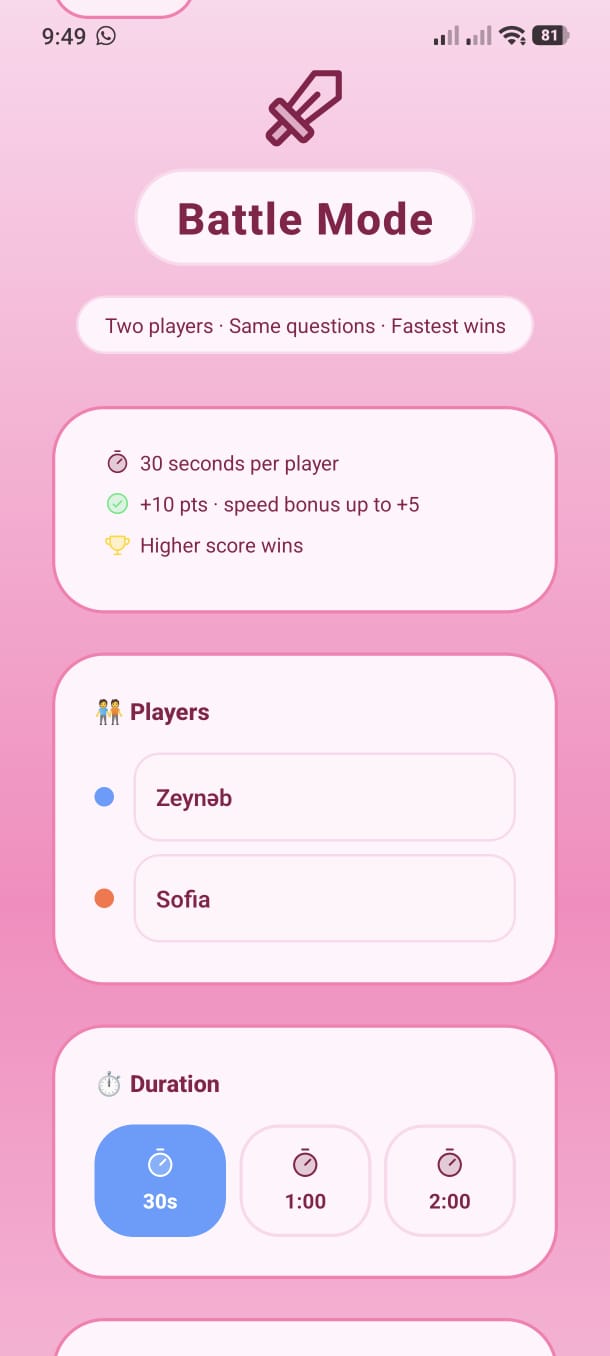
Also add gameplay & result screenshots:
screen-battle-play.png
screen-battle-result.png