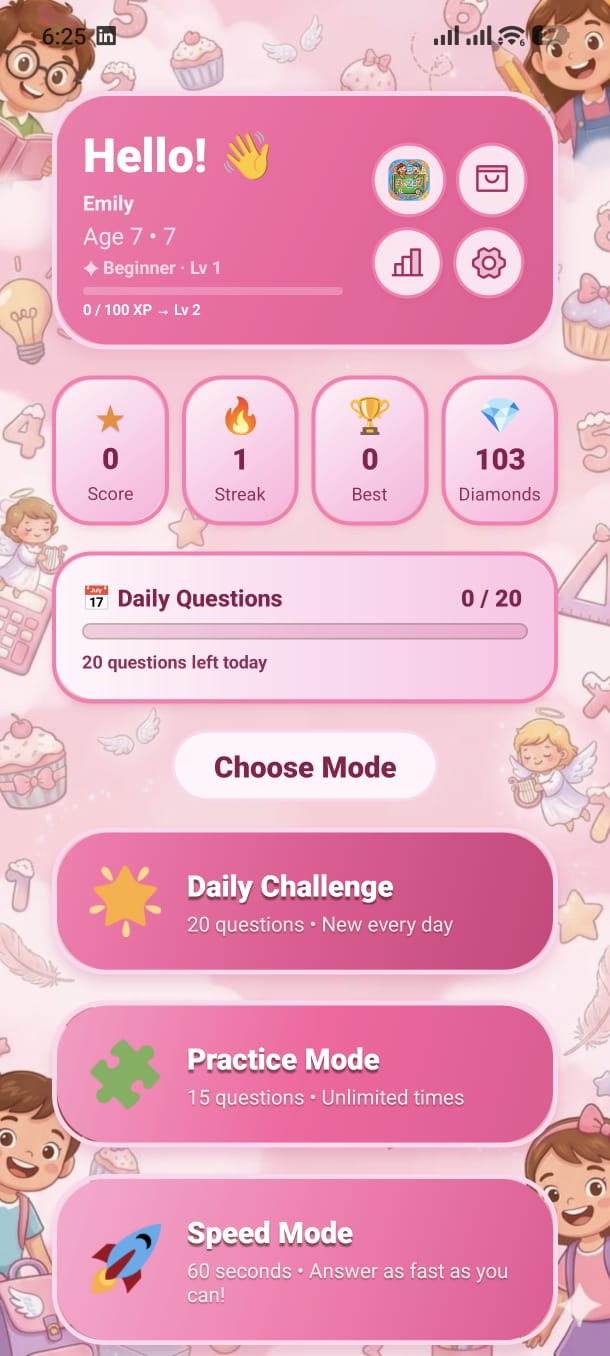
Your personal dashboard — see your rank, track daily progress, and launch any of the 6 game modes from one central screen.
The colourful gradient card at the top is your player identity. It shows:
Rank & Level
Your current rank title (e.g. "Math Rookie") and numeric level displayed as a badge.
XP Progress Bar
Shows how much XP you've earned toward the next level, plus a percentage fill bar.
Player Name & Age
Your display name and the current age group you are playing in.
Avatar
Tap the avatar to go to your Profile page. Unlock new avatars in the Shop.
Four animated stat cards sit below the header. Each card spins its icon every few seconds to catch your eye:
Total Score
Cumulative points earned across all sessions ever played.
Daily Streak
How many consecutive days you've played. Miss a day and it resets!
Best Score
Your highest single-session score — your personal record to beat.
Diamonds
Currency earned by playing. Spend in the Shop on avatars and backgrounds.
The horizontal progress bar shows how many questions you've solved today out of your daily free allowance. When the bar is full, you've completed your daily set.
Below the progress bar, six colourful buttons launch each game mode. Tap any to start immediately:
Daily Challenge
A fresh set of questions every day. Shows ✅ when already completed for today.
Practice Mode
Choose your operation and drill at your own pace with no timer.
Speed Mode
Race the clock. Answer as many as you can before time runs out.
Mixed Challenge
Random mix of all unlocked operations. No setup required.
Battle Mode
Two players compete on the same device. Who solves more?
Mistakes Practice
Retry every question you previously got wrong. Badge shows count.
Four icon buttons in the top-right corner give quick access to key sections:
At the bottom of the Home screen you'll also find:
Two special modals can appear when you open the app:
Welcome Bonus
Shown only the very first time you launch the app. You receive starter coins to spend in the Shop.
Daily Login Bonus
Every day you open the app, a modal shows your login streak and the coins you earned for that day.
Add your screenshot here
guide/img/screen-home.png