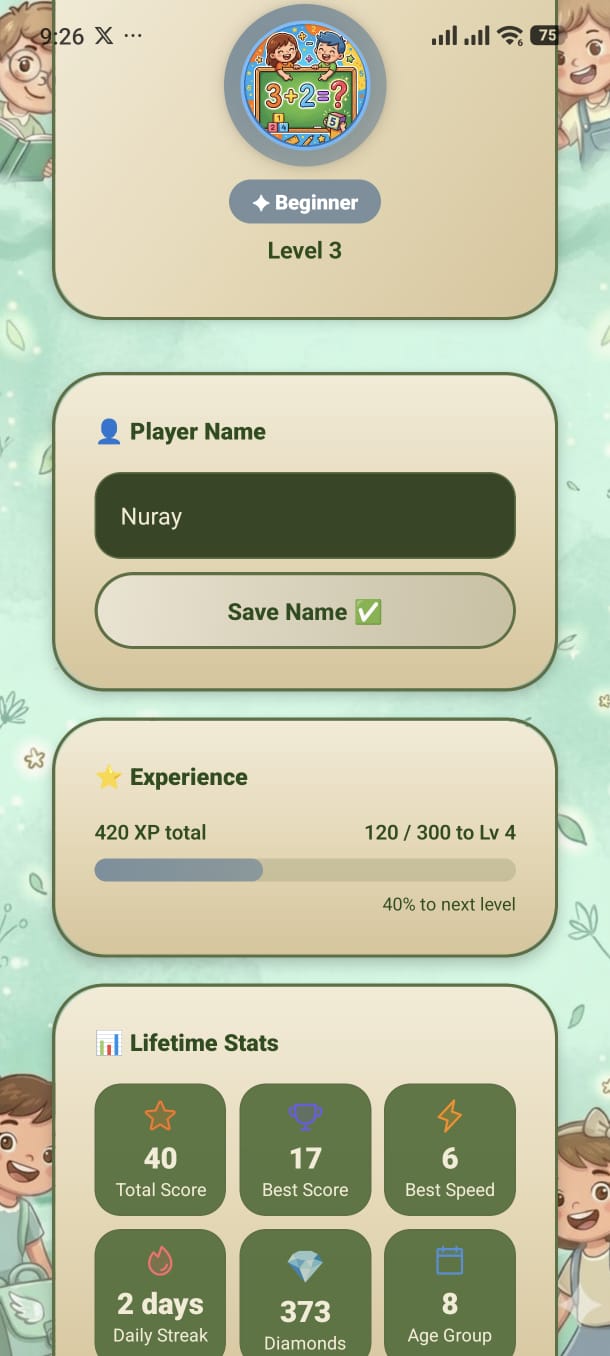
Your personal identity card — see your rank, level, XP progress, lifetime records, and customise your name and avatar.
At the top of the screen, a large circular avatar is displayed inside a gradient border coloured by your current rank. Below the avatar you'll see:
The avatar displays the emoji or graphic you have equipped from the Shop. Tap the avatar or the Shop shortcut button to open the Shop and change it.
Your display name is fully editable:
The keyboard appears. The current name is pre-filled and ready to edit.
Maximum 20 characters. Any combination of letters, numbers, and symbols is allowed.
The button shows a brief saving state, then confirms the change. Your new name immediately appears on the Home screen header card.
The Experience card shows a detailed breakdown of your progression:
Six stat tiles show your all-time personal records:
Total Score
Sum of all points from every session played.
Best Score
Highest score achieved in a single session.
Best Speed Score
Your personal record from Speed Mode sessions.
Daily Streak
How many consecutive days you've played.
Coins
Current coin balance available to spend in the Shop.
Age Group
Your currently selected age group.
A "Customize in Shop" button at the bottom of the Profile screen is a direct shortcut to the Shop where you can unlock new avatars and backgrounds using your coins.
Add your screenshot here
guide/img/screen-profile.png