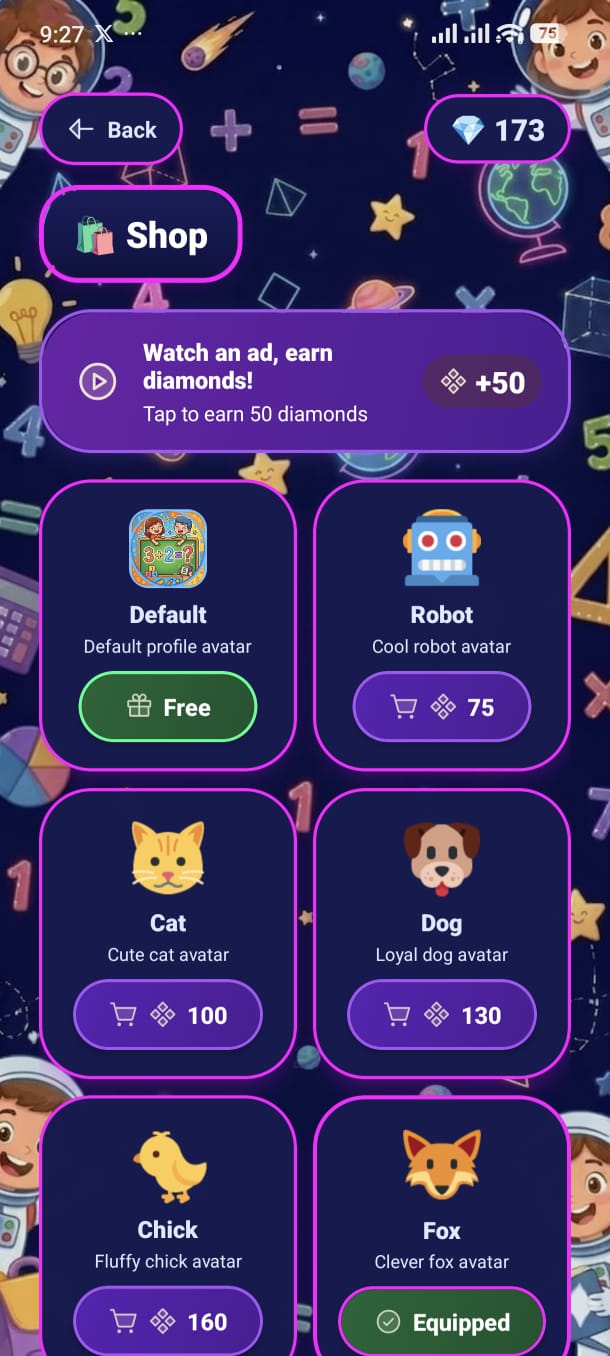
Use the coins you earn from playing to unlock custom avatars and backgrounds. Personalise your profile and make it your own.
Your current coin total is shown as a 💎 pill in the top-right corner of the Shop screen. Coins are earned automatically while you play — every correct answer, streak bonus, daily login, and rewarded ad contributes to your balance.
A banner at the top of the shop offers a rewarded video ad. Tap it to watch a short video and instantly receive bonus coins:
Ad Available
The banner shows "+ X coins" and a play icon. Tap to watch and earn.
Ad Limit Reached
The banner is greyed out. Ad rewards are capped per day — come back tomorrow.
All available items are displayed in a 2-column grid. Each card shows the item emoji/image, its name, a short description, and a status button. The button changes based on the item's current state:
Free
Price = 0. A green "Free" button with a gift icon. Tap to claim and equip immediately.
Buy (coins available)
You have enough coins. A purple "Buy" button shows the price. Tap → confirmation dialog → purchase.
Buy (not enough coins)
Insufficient funds. The button is greyed out. Earn more coins by playing sessions or watching ads.
Equip
You own this item but it's not active. Green "Equip" button — tap to set it as your current avatar or background.
A confirmation dialog appears: "Are you sure you want to buy [Item] for X coins? You currently have Y coins."
Tap Confirm. Coins are deducted and the item is added to your owned items collection.
The item button changes to "Equip". Tap it to activate the new avatar or background.
Add your screenshot here
guide/img/screen-shop.png