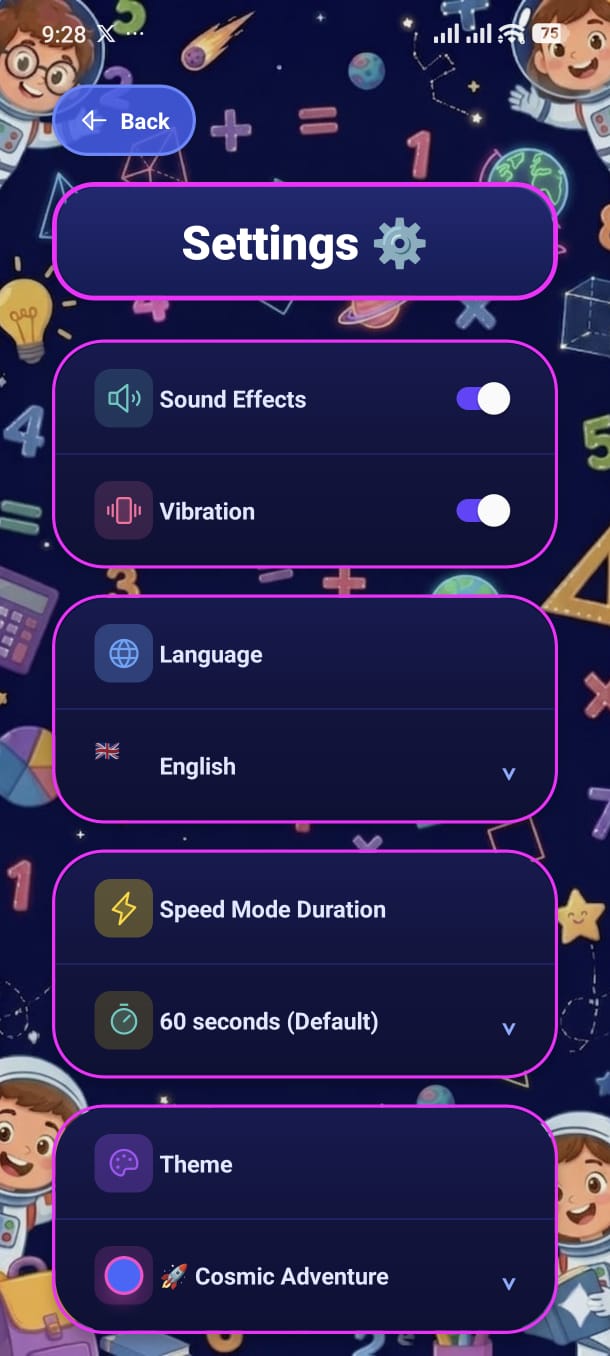
Tweak every aspect of the app — sounds, language, Speed Mode timer, visual theme, and more. All changes take effect immediately.
Sound Effects
Toggle all in-game sound effects on or off — correct answer chimes, wrong answer buzzes, and UI clicks.
Vibration
Toggle haptic feedback on or off. When enabled, a short vibration plays on answer feedback events.
The app supports 14 languages. Tap the language row to open a picker and select your preferred language. The entire app UI — menus, labels, and mode names — switches instantly:
English, Spanish, French
EN · ES · FR
Turkish, Azerbaijani
TR · AZ
Russian, Chinese, Japanese, Korean
RU · ZH · JA · KO
German, Portuguese, Italian
DE · PT · IT
Arabic
AR
Set the default countdown timer for Speed Mode. This setting persists — every future Speed Mode run uses this duration until you change it again:
Tap Change Theme to return to the Theme Selection screen. Your current theme is shown next to the button so you always know which one is active.
Available themes: 🌿 Forest · ✏️ Colorful · 🍬 Kawaii · 🚀 Cosmic
The current daily question limit is displayed here as a read-only reference. To change the limit, parents must use the Parent Dashboard (PIN protected).
Add your screenshot here
guide/img/screen-settings.png